Soldr / Tools
AI wiring diagram generator for Arduino and ESP32
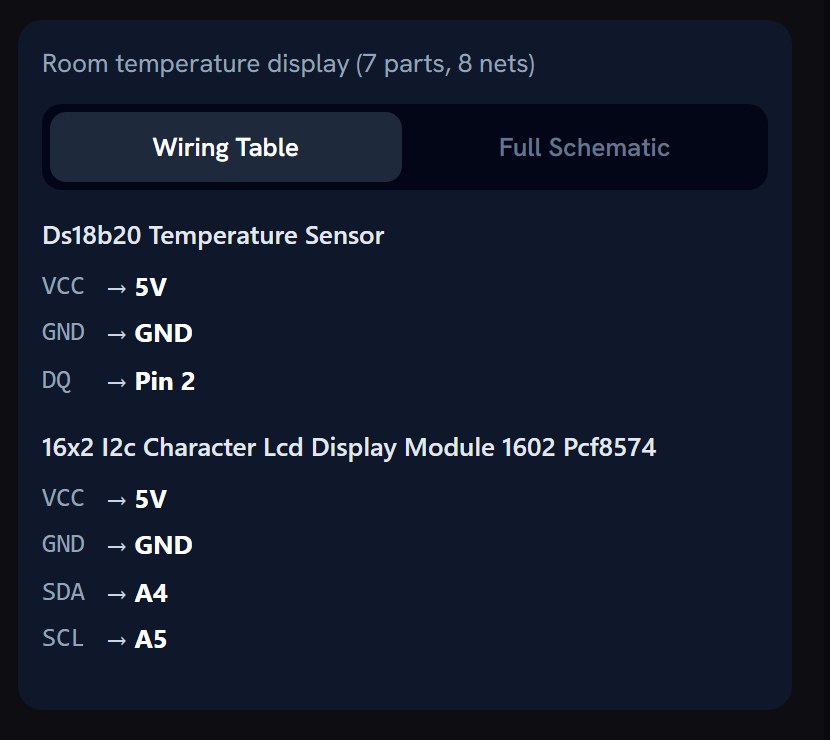
Soldr turns a build description into wiring you can follow: a table of every connection, pin by pin, for the exact board, and a schematic of the same circuit. The code it writes uses the same pins, so the diagram and the sketch agree.
What you get
- A Wiring Table: each part's pins and where each one goes on the board.
- A schematic: the same circuit as a diagram.
- Wiring steps: one step per part, grounds first.
- Notes where it matters: a pull-up a sensor needs, a pin it moved and why, or how to set an adjustable converter before you connect it.
The checks behind it
The wiring is planned against each part's own data: the board's free and safe pins, which parts share an I2C bus, which run at 3.3 V and which at 5 V, and what each part draws from the supply. When a build needs something to work, such as a level shifter or a separate supply for a motor, Soldr adds it or tells you. More in Wiring & pins.
Code that matches the diagram
The sketch is written from the same pin plan as the diagram, compiled on our server, and flashed from Chrome or Edge, with no IDE to install.
Parts that exist
Every part Soldr picks is one Compoden stocks, shown In Stock with its price. Buy all puts every part in one Compoden cart, shipped across India; COD if checkout offers it for your order.
What it costs
Questions are free. Generated code costs credits, priced by the size of what is written, and a compile costs 5 credits. Sign in and get 100 credits free.
Questions
Is it a schematic or a breadboard picture?
Both a Wiring Table and a schematic: every connection pin by pin, and the circuit as a diagram.
Does the code use the same pins as the diagram?
Yes. The code is written from the same pin plan, so the pins in the sketch are the pins in the Wiring Table.
Which boards?
Arduino, ESP32 and Raspberry Pi Pico boards, among 674 board targets Soldr writes code for.
Is it free?
Questions are free; code and compiles cost credits. Sign in and get 100 credits free.