Soldr / Tools
What an AI-native IDE for hardware looks like
Soldr is an AI-native, web-based development environment for Arduino, ESP32 and Pico. Describe the build; it picks real parts, shows how to wire them, writes the code, compiles it and flashes your board from Chrome or Edge, with no IDE to install.
Why hardware needs more than code completion
In software, code is the whole product. In hardware the code is the last step: before it come the parts, the pins, the voltages and the supply. An AI that only writes code guesses at all of those. An AI-native environment for hardware plans them first and writes the code from that plan.
What is in it
- Parts picked from stock with prices, with anything the build needs to work added or named.
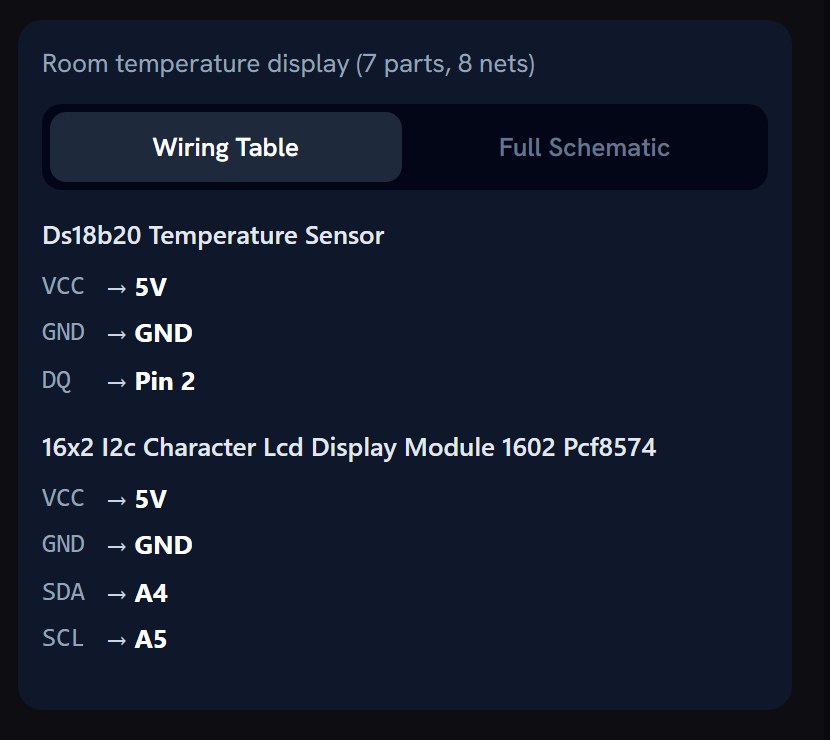
- Wiring pin by pin for the exact board, and a schematic.
- Code written from the same pin plan, in an editor you can type in.
- Compile on our server and flash from Chrome or Edge.
- Serial Monitor next to the code.
For makers and for prototyping at work
The same flow serves a first project and a quick prototype at work: a parts list you can order in one cart, wiring you can hand to someone else, and code you can take into your own tools.
What Soldr checks before it writes code
- Free, safe pins: no part on a pin the board needs to boot, on an input-only pin, or on a pin already in use. When the board runs out, it says which part has no pin.
- Shared buses: two I2C parts at the same address are told apart (an address pin tied high, for example).
- Logic levels: a 5 V part on a 3.3 V board gets a divider or a level shifter, or a note.
- Power: what every part draws against what the supply and the board's pins can give, including a servo's start-up peak; an adjustable converter comes with the voltage to set it to before you connect it.
- Your own parts: tell it what you already own and the build uses them instead of adding new ones.
The details are in Wiring & pins.
What it costs
Questions are free. Generated code costs credits, priced by the size of what is written, and a compile costs 5 credits. Sign in and get 100 credits free.
Questions
What does AI-native mean here?
The AI plans the parts and wiring and writes code from that plan, inside one browser tool, rather than suggesting code beside an editor.
Which boards?
Arduino, ESP32 and Raspberry Pi Pico boards flash from the browser; Soldr writes code for 674 board targets in total.
Can I take the code to my own IDE?
Yes. Copy or download the sketch into the Arduino IDE or PlatformIO.
Is it free?
Questions are free; code and compiles cost credits. Sign in and get 100 credits free.