6 November 2026 · Soldr
Best AI for Arduino coding: what to look for
Short answer: the best AI for Arduino coding is the one that knows your hardware, not just C++. Look for eight things: real parts, pins from the board's actual pinout, pin-safety checks, bus and logic-level checks, a power budget, wiring that matches the code, a compile before you see the code, and a way to flash and test. Any tool can write a sketch; few check it against the board on your desk.
Every capable model can write an Arduino sketch that looks right. The variable names are sensible and the comments are helpful. The trouble starts at the bench: a sensor on a pin that doesn't exist on your board, a 5 V module on a 3.3 V pin, a servo that browns out the board, a sketch that won't compile against the library you actually installed. None of those are C++ problems. They're hardware problems, and a good AI for Arduino has to know the hardware.
Here's a checklist you can hold any tool to, and how Soldr handles each item.
1. It picks real parts, not generic names
"A temperature sensor" isn't a part. A DHT22 module on a 3-pin breakout is. The pinout, the voltage and whether you need a pull-up resistor all depend on the exact module. Ask: does the tool name a specific part you can buy, and does the code match that part?
In Soldr: every part it picks is one Compoden stocks, shown in stock, and the reply says why each part was chosen. You can tell it what you already own, and the build uses that instead.
2. Pins come from the board's real pinout
Pin numbers are where AI-written sketches most often go quietly wrong, because a plausible number looks exactly like a correct one. Ask: where did this pin number come from?
In Soldr: pins are allocated from the manufacturer's published pinout, stored with its source and the date it was read. When there's no verified pinout for a board, it says so and asks you which pins you've wired rather than guessing. More in how do you know which pin to use.
3. It checks pin safety, not just pin numbers
On an ESP32, some pins decide how the chip boots, some are input-only, and some are already used by the flash memory. Put a sensor on the wrong one and the board may refuse to start, even though the code compiles.
In Soldr: no part goes on a pin the board needs to boot, on an input-only pin, or on a pin already in use. When a board runs out of pins, it tells you which part has no pin.
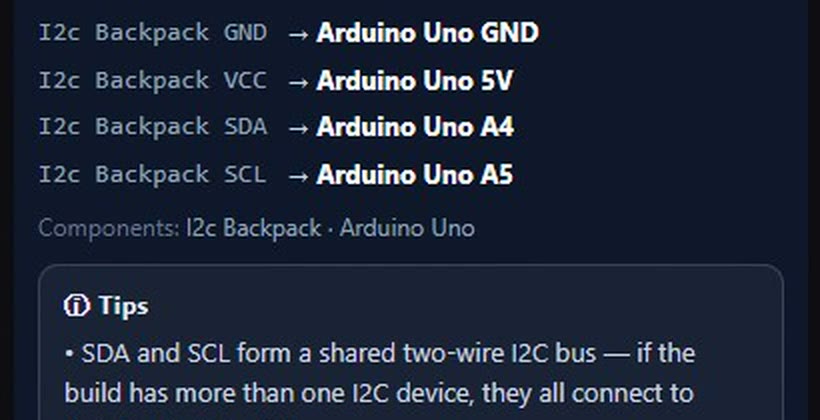
4. It checks shared buses and logic levels
Two I2C parts at the same address will fight. A 5 V module talking to a 3.3 V board can damage the board. Ask: does the tool notice?
In Soldr: two I2C parts at the same address are told apart (an address pin tied high, for example), and a 5 V part on a 3.3 V board gets a divider, a level shifter or a note. The wiring steps say when parts share a bus:
5. It adds up the power
A sketch can be perfect and the build still resets every time a motor starts, because the supply can't keep up. Ask: does the tool tell you what the parts draw and whether your supply covers it?
In Soldr: every build has a power check: what each part draws against what the supply and the board's pins can give, including a servo's start-up peak. Here's the one for an ESP32 weather display:
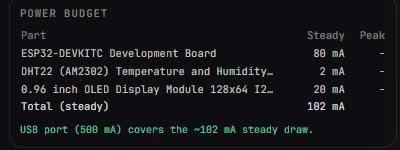
When it can't size a supply, it says that too, rather than staying quiet. For the classic failure, read your ESP32 reboots the moment the motor starts.
6. The wiring matches the code
If the wiring diagram and the sketch come from two separate guesses, they can disagree, and you find out at the bench. Ask: are they generated from the same plan?
In Soldr: the pin plan comes first; the wiring steps and the code are both generated from it, and the sketch's own header says so. When the code doesn't use a pin the plan assigned, Soldr names the pin and the part. The details are in code that reviews its own wiring.
7. It compiles the code before you see it
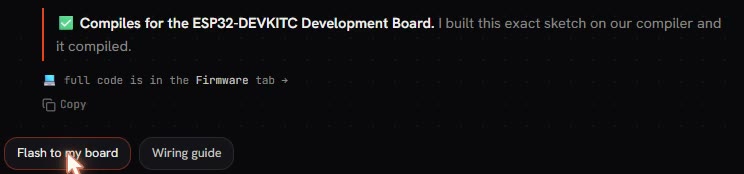
Compiling doesn't prove a sketch is right, but a sketch that doesn't compile is certainly wrong. Ask: has anyone compiled this?
In Soldr: it compiles the exact sketch on its own compiler and shows the result. If it couldn't check the code, it tells you so.
8. You can flash it, change it and watch it
The last mile is getting the code onto the board and seeing what it does. Ask: do you have to set up a separate toolchain to try it?
In Soldr: the code sits in an editable Firmware tab. You can change it and recompile in the browser, then flash supported boards from Chrome or Edge with no IDE to install. There's a Serial Monitor in the same tab. Step by step: how to upload code to an ESP32 from your browser. Prefer the Arduino IDE? Download the sketch and use it there.
A quick way to test any tool
Ask it for a build on a board you own, then check three things against the board's own pinout: are any pins boot or input-only pins, does the wiring match the pins in the code, and does it say what powers the build? A tool that gets those right on your board is worth your time.
Parts from the examples
More on general-purpose chatbots and hardware: an honest look at chatbots for Arduino and ESP32 and why a chatbot can't build your project for you. Soldr's tools: Arduino code generator, ESP32 code generator and AI wiring diagram generator.
Questions
What is the best AI for Arduino coding?
The one that checks your hardware: real parts, pins from the board's pinout, pin safety, power, wiring that matches the code, and a compile before you flash.
Can AI write Arduino code that works on my board?
It can, when it knows the exact board and parts. Code written without the pinout and power in mind often compiles and still fails at the bench.
Does Soldr work with ESP32 as well as Arduino?
Yes. It writes code for Arduino boards, ESP32 boards and the Raspberry Pi Pico, and flashes supported boards from Chrome or Edge.
Is it free to try?
Questions are free; code and compiles cost credits. Sign in and get 100 credits free.
Describe your Arduino build on Soldr and check it against this list.