8 November 2026 · Soldr
Diwali electronics projects with an ESP32: three builds to try
Short answer: three festive builds that run on USB, with no flame and no smoke: a greeting screen that draws a diya, an eight-LED chaser with three patterns, and a touch-pad fireworks game on a colour screen. Each one has a ready-made prompt below that opens Soldr with the build described.
Diwali is a good excuse to build something that lights up. These three projects came out of our own bench this week. They use an ESP32 DevKitC, parts that plug into a breadboard, and a USB cable for power. Each section says what's real so far: which one we've run on a board, and which ones have only been compiled.
1. A greeting screen with a diya, coins and a kalash
A 2.4 inch colour TFT that cycles festive wishes with drawn pictures: a glowing diya, gold coins and a kalash. We built this one for Dhanteras, ran it on a real ESP32 and filmed it.
Parts: ESP32 DevKitC, a 2.4 inch ILI9341 SPI TFT, jumper wires, a USB cable.
What we learned: our first prompt didn't name a board, so Soldr asked which platform to use before picking any parts. We answered "ESP32". Naming the board in the first message saves that round trip.
To change the wording, edit the strings in the code and recompile in your browser. The screen is redrawn from the code, so there are no image files to upload.
2. An eight-LED chaser with three patterns
Eight LEDs in a row on a breadboard: a single light running end to end, a bouncing light, and an odd/even blink, eight seconds each, on repeat. At startup each LED pulses once in order, which doubles as a wiring check: if one stays dark, you know which one to look at.
Parts: ESP32 DevKitC, eight 5 mm LEDs, eight resistors, a breadboard and jumper wires.
Status: compiled on Soldr this week; we haven't filmed it yet. Soldr's notes put the current at "roughly 9 mA per LED" with 150 Ω resistors at 3.3 V, comfortably within what the pins and a USB port can supply. It also pointed out that a resistor pack may not include 150 Ω, and that 100 or 220 Ω work too.
Wire each LED to the pin listed at the top of the sketch, long leg toward the resistor and pin, short leg to ground. Want it faster? The step times are named constants near the top; change one and recompile.
3. Touch-pad fireworks on a colour screen
An eight-pad touch module and a colour TFT. Each pad sets off a different firework on screen, with sound from a small buzzer:
- Pad 1: a chakri spinning and throwing orange and gold sparks
- Pad 2: an anar cone shooting golden sparks upward
- Pad 3: a rocket that whistles up and bursts into a coloured shower
- Pad 4: a crackling white phuljhadi
- All four at once: a rapid ladi finale
Pads 5 to 8 are left free, so you can add your own fireworks later.
Parts: ESP32 DevKitC, a 2.4 inch ILI9341 SPI TFT, a TTP226 8-channel touch module, a passive buzzer, jumper wires.
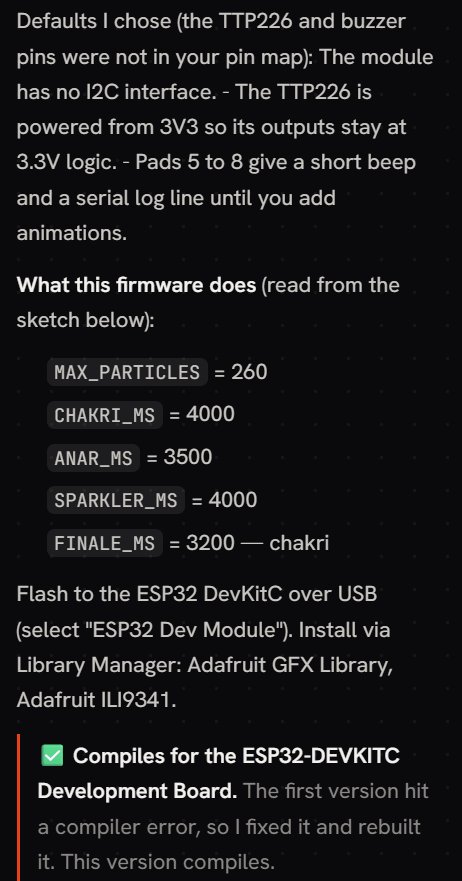
Status: compiled on Soldr. As the screenshot shows, its first version didn't compile; Soldr fixed the error and rebuilt it before showing the result. Not yet filmed on a board. Each animation's length is a constant at the top of the sketch (the chakri runs 4 seconds), so they're easy to tune.
The touch module reads each pad on its own pin. Power it from the ESP32's 3.3 V pin so its outputs match the ESP32's logic level, as the sketch's defaults say.
Make it yours
Each build is a starting point. A few changes that are easy to ask for once the first version is working:
- Greeting screen: add your family's names to the wishes, or a button that steps to the next wish instead of waiting.
- LED chaser: "add a button to change the pattern", or "add a fourth pattern where the lights fill up one by one and then empty".
- Fireworks game: pads 5 to 8 are free. Describe a new firework for one of them, for example a pencil that throws thin streaks of coloured sparks, and ask Soldr to add it.
Ask for one change at a time, so that if something stops working you know which change did it. For more on phrasing, see how to describe a hardware build to an AI code generator.
Before you power on
- Use a data USB cable, not a charge-only one, or the board won't show up for flashing.
- Open the Serial Monitor at 115200 baud. These sketches print a short self-test at startup. If something's wrong, the lines tell you which part and what to check. Here's how to read them.
- Keep the touch pads clear at power-up. A hand on the pads while the board starts reads as a touch.
- Stay on USB. None of these needs more than a USB port supplies. If you scale up to a long LED strip, read our power budget guide first.
Parts on Compoden: ESP32-DevKitC, 2.4 inch ILI9341 TFT, TTP226 touch module, 5 mm LED pack, resistor pack. Reference pages with the datasheet details: ILI9341 TFT, TTP223 touch sensor, ESP32-DevKitC.
Happy Diwali. Open any of the builds above, or describe your own on app.soldr.ai. Sign in and get 100 credits free.