8 November 2026 · Soldr
ESP32 and Arduino power budget: will USB be enough?
Short answer: add up two numbers for every part: its steady draw and its peak. Sensors and small screens rarely matter. The ESP32's Wi-Fi bursts, motors, servos and long LED strips do. If the peaks together get close to what your supply can give, move the hungry parts to their own supply and join the grounds.
Most "random" resets in a hardware project aren't random. The board browns out: something draws a burst of current, the supply voltage dips for a few milliseconds, and the microcontroller restarts. It looks like a code bug and it isn't one. A two-minute power budget catches most of these before you wire anything.
A real budget from a real build
Here's the power panel Soldr showed for a motion-reactive desk toy: an ESP32 DevKitC, an MPU6050 motion sensor and a 0.96 inch OLED, powered from USB.
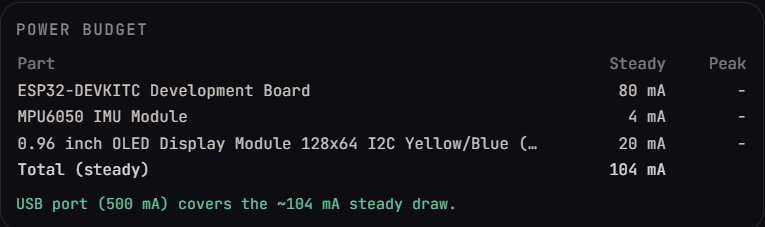
The steady total is about 104 mA against a 500 mA USB port. Comfortable. But the note under it, in the chat, is the more useful part. Soldr wrote that this is "the total of the parts with figures on file, not the whole build's measured draw", that "the board can peak up to 500mA", and that it "could not establish the USB supply's available current". That's the right shape for a budget: what you know, what peaks, and what you don't know yet.
Steady draw is the easy half
Most sensors and small displays are tiny loads. From the datasheets on our reference pages:
- The SSD1306 OLED controller draws well under a milliamp itself (50 µA typical on its logic supply, 430 µA on its panel supply with every pixel on). The module adds its own regulator and booster, which is why a budget counts a whole OLED module at tens of milliamps instead.
- The MPU6050 draws 3.9 mA with all six axes and its motion processor running.
Add those up and you'll rarely trouble a USB port. The trouble comes from the next section.
Peaks are where builds fail
The ESP32 itself, when Wi-Fi transmits
The ESP32 datasheet lists transmit current up to 240 mA (802.11b at 19.5 dBm), with receive around 95 to 100 mA. Espressif's module datasheet asks for a supply that can deliver at least 0.5 A. Those numbers are on our ESP32 board and ESP32-WROOM-32 pages with their table references. A weak cable or a long USB hub chain can sag during those bursts even when the average looks fine.
Servos and motors
This is the big one. The MG996R servo's product page gives 170 mA moving with no load and 1,400 mA at stall. One stalled servo is nearly three times what a USB 2.0 port supplies. Two of them, and no USB port has a chance. Servos and motors get their own supply, sized for the stall current, with its ground joined to the board's ground. We wrote up exactly this failure in why your ESP32 reboots the moment the motor starts.
LED strips and rings
Addressable LEDs add up fast, and here the datasheet doesn't help: the WS2812B datasheet gives the supply range (4.5 to 5.5 V) but no current per pixel. So measure your strip or ring at the brightness you'll use, cap the brightness in code, and give long strips their own 5 V supply. Small LED rows are fine on USB. With 8 plain LEDs on an ESP32, each through a 150 Ω resistor at 3.3 V, Soldr worked out "roughly 9 mA per LED": about 72 mA for all eight, before the board itself.
GPIO pins are not power outputs
A pin can light an LED. It can't run a motor, a relay coil or a buzzer louder than a squeak. The ESP32-WROOM-32 datasheet gives about 40 mA source and 28 mA sink per pin at maximum drive strength. Design well under that, and switch anything heavier through a transistor, a MOSFET or a driver module.
Budget a build in five steps
- List every part that draws power, including the board.
- Write down steady and peak for each, from the datasheet or product page. Mark the ones you can't find, rather than guessing.
- Add the peaks that can happen together (Wi-Fi transmitting while a servo moves, for example).
- Compare with the supply's rating, and leave margin. A USB 2.0 port is 500 mA; a phone charger states its own rating on the label.
- Split the supply if the peaks don't fit: motors, servos and LED strips on their own supply, grounds joined, the board on USB or its own regulator.
Where Soldr helps
A Soldr build shows a power budget next to the parts, built from the figures on file for each part, with a line saying whether the planned supply covers the steady draw. The chat explains the plan (USB, a bench supply, or battery) and says what it couldn't establish. That's a starting point, not a measurement: if a part's figure is missing, the budget says so, and you should check that part yourself.
Parts mentioned here, on Compoden: MG996R servo, SG90 servo, ESP32-DevKitC. Choosing pins as well? See which pin to use and why it matters.
Describe your build on app.soldr.ai to see its power budget. Sign in and get 100 credits free.