6 November 2026 · Soldr
Is AI-generated Arduino code safe to flash? How Soldr checks it
Short answer: the code itself rarely damages a board; the hardware around it does. AI-generated code is as safe to flash as the checks behind it: pins that are free and safe on your board, matching logic levels, a power supply that can keep up, wiring that matches the code, and a successful compile. Soldr runs those checks before you see the code, and says plainly when it can't verify something.
Flashing a sketch can't usually hurt a board on its own. What hurts boards is the combination of code and wiring: an output driving a pin that's shorted to ground, a 5 V module on a 3.3 V input, a motor drawing more than the supply can give, or a sensor on a pin the chip needs to boot. AI makes it easy to produce code quickly, so the question is whether anything checked those things. Here's what to look for, and how Soldr handles each.
1. Is every pin free and safe on this board?
On an ESP32, some GPIOs are read at boot to decide how the chip starts; others are input-only, or tied to the flash memory. Put a part on the wrong one and the board may not boot at all, even with perfect code.
What Soldr does: pins are allocated from the board's published pinout. No part goes on a pin the board needs to boot, on an input-only pin, or on a pin already in use. When the board runs out of suitable pins, it tells you which part has no pin rather than doubling one up. The pinout comes with its source and the date it was read, for example:
"Pins came from seeedstudio.com, read 2026-08-14. I extracted them from the vendor's page — I did not measure your board. Check them against your silkscreen before you wire anything."
2. What if the board's pinout isn't known?
This is the riskiest case: a confident pin number with nothing behind it. The safe behaviour is to refuse to guess.
What Soldr does: it says so, and asks for your wiring instead:
"I don't have a verified pinout for the Wio Terminal. I can still compile for it, but I won't guess pin numbers at you — a wrong pin you have no reason to doubt is the one mistake here you can't recover from. Tell me which pins you've wired and I'll write the sketch against those exactly."
3. Do the logic levels match?
An Arduino Uno runs at 5 V; an ESP32 and many sensors run at 3.3 V. A 5 V signal into a 3.3 V pin can damage it over time or at once.
What Soldr does: a part on the wrong logic level gets a voltage divider, a level shifter, or a note telling you what to add.
4. Can the supply keep up?
Motors and servos draw far more when they start or stall than when they run. A board powered through its own pins can brown out and reset, or the regulator can overheat.
What Soldr does: every build gets a power check: what each part draws against what the supply and the board's pins can give, including a servo's start-up peak. Robot builds give the motor driver its own supply. If an adjustable converter is in the build, it comes with the voltage to set it to before you connect it. When it can't size the supply, it says so.
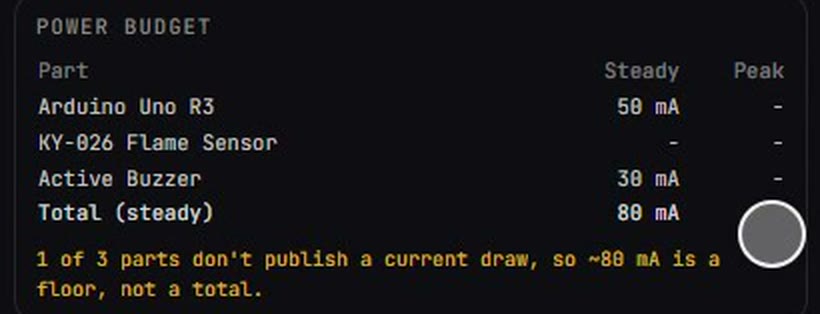
The usual symptom when this goes wrong: a board that reboots the moment a motor starts.
5. Does the code use the pins the wiring says?
If the wiring diagram and the code disagree, you can drive a pin that's wired to something else. That's the mismatch most likely to cause real damage, because nothing looks wrong.
What Soldr does: the wiring and the code are both generated from one pin plan, and the code is checked against it. When the code doesn't use a pin the plan assigned, you're told which pin and which part:
"the firmware does not use the pin we assigned to the Rain Drop Sensor Module (GPIO3). The wiring diagram is generated from that assignment, so the schematic and the code will disagree — rewire to match, or ask me to regenerate against your wiring."
More: code that reviews its own wiring.
6. Does it compile?
A sketch that doesn't compile can't be flashed, but a sketch that compiles for the wrong board can. The compile should be for your board.
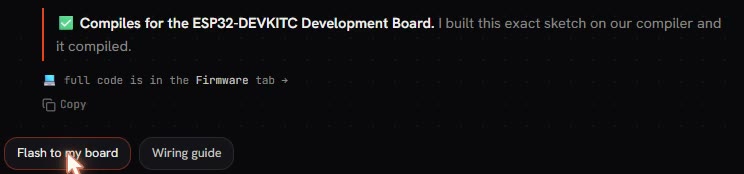
What Soldr does: it compiles the exact sketch for the board in your build and shows the verdict. If it couldn't check the code, it says so.
What no tool can check for you
- Your actual wiring. Check each wire against the steps, with the board unplugged.
- Your actual parts. A module from a different maker can have a different pin order. Check the printed labels against the parts list.
- Your actual supply. Batteries sag; adapters vary. Measure if it matters.
Then flash a hardware test sketch first, and the full code second. As a guest you get exactly that test sketch. The whole routine: using AI to write Arduino code without frying boards.
Parts that come up in these checks
- ESP32-DEVKITC: 3.3 V logic, boot-sensitive pins
- Arduino Uno R3: 5 V logic
- 0.96 inch I2C OLED: a shared-bus part with an address
More: which pin to use, and why it matters, what to look for in an AI for Arduino coding, and why a chatbot can't build your project for you.
Questions
Can AI-generated code damage my Arduino?
Code alone rarely does. Damage comes from code plus wiring: a wrong pin, a mismatched logic level, or a supply that can't keep up. Check those before flashing.
How does Soldr check code before I flash it?
It allocates pins from the board's published pinout, avoids boot and input-only pins, checks logic levels and power, generates the wiring and code from one pin plan, and compiles the sketch for your board.
What if my board isn't supported?
Soldr says it has no verified pinout and asks which pins you've wired, rather than guessing.
What does it cost?
Questions are free; code and compiles cost credits. Sign in and get 100 credits free.
Check your build on Soldr before you flash it.