8 November 2026 · Soldr
Board and sensor pinouts with a source on every value
Short answer: soldr.ai now has 176 reference pages for the boards and modules Soldr builds with: 47 boards and 129 components. Every spec and pin row names its source, almost always the manufacturer's datasheet or official page, down to the page or section. Where the official source doesn't cover something, the page says so instead of filling the gap.
Pinouts are the part of a project people copy most and check least. A diagram from a search result can be for a different revision, a clone with a different header order, or the bare chip instead of the module. AI tools that answer from memory have the same problem in a new form: they can state a pin number fluently whether or not it's right. When a wrong pin can mean a dead sensor or a board stuck in boot mode, "fluent" isn't good enough.
So we wrote reference pages where every value can be checked.
What's on each page
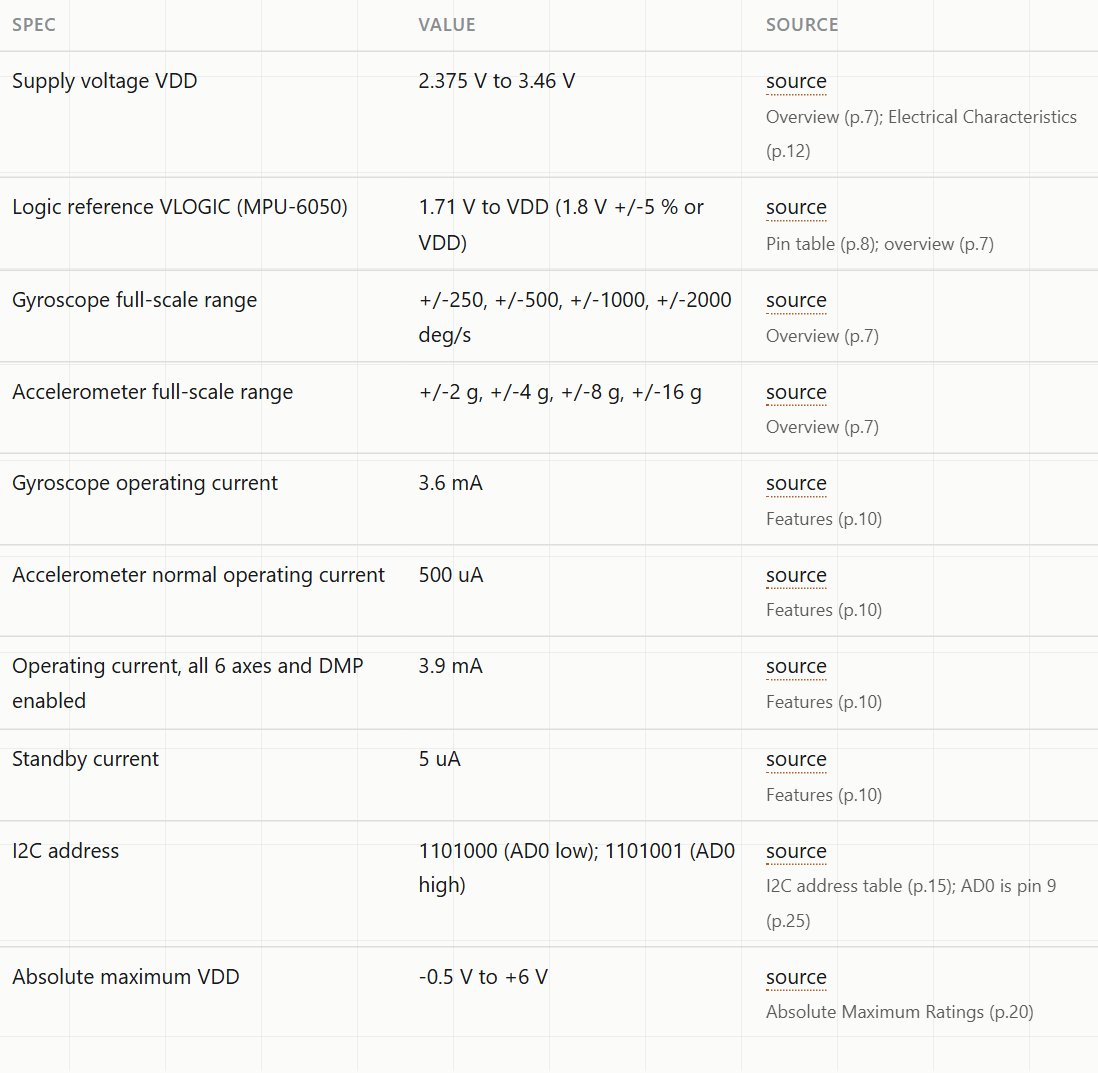
- Specs and power, each with a source. The table has three columns: the spec, the value, and where it came from, down to the page or section. The few values that only the product listing states are marked as such.
- A pin table, when an official source gives one.
- Common mistakes, each tied to the line of the datasheet that explains it.
- Not covered by the official source: what the documents don't say about this part.
- Build with it: three or four project ideas that open Soldr with the prompt filled in.
Here's the spec table for the MPU6050 motion sensor. The I2C address row, for example, cites the datasheet's address table on page 15:
Four kinds of pinout, labelled
Not every part has an official board pinout, and pretending otherwise is how wrong diagrams spread. Each page carries one of four labels:
- Official pinout: the maker publishes the board's header, and the table follows it. Example: the ESP32-WROOM-32 module.
- Chip-level pinout: only the chip's datasheet exists. The table lists the chip's pins, and the page says the module's header may label or expose them differently. Many small sensor modules are like this, the MPU6050 among them.
- Reference-design pinout: the board we stock is a copy of a published reference design, and the table follows that design.
- Pinout not published: no source we could verify gives a pin table, so there isn't one. The page tells you to go by the labels printed on your module.
Variant notes where the details differ
Some parts are sold under one name in more than one version. Those pages say which version they describe, at the top, before any numbers:

- The Pro Mini 5V page follows the reference design and says the stocked board is a compatible clone.
- The Arduino Nano 33 BLE Sense page covers Rev1 only, because Rev2 uses different sensors.
- The STM32 Black Pill page says its pin table is partial and lists which pins are missing.
Safety notes sit at the top too. The ZMPT101B AC voltage sensor page opens by saying that wiring its mains side is for a qualified person only, and its project ideas stay on the low-voltage side.
Gaps, said out loud
Datasheets describe chips, not every module built around them. A sensor module's regulator, pull-up resistors and header order are often in no official document at all. Our pages list those gaps under Not covered by the official source, so you know which details to check on your own board, rather than reading a confident number that nobody verified.
How a page gets checked
Each page is written from saved copies of the source documents, not from memory. A second pass then reopens the source for every spec and pin row and compares the value. Pages that don't match go back for fixes; pages whose source turns out to describe a different version of the part are held until the right document is found. That second pass is why some pages are missing from the index: we'd rather publish fewer pages than a pin table for the wrong revision.
Two things get extra scrutiny:
- Values that differ between chip and module. A sensor chip may be rated 3.6 V while the module carrying it takes 5 V through a regulator. The page gives the chip's rating from the datasheet and says the module's input isn't covered by it, rather than printing a number nobody can trace.
- Project ideas. Each idea uses parts we stock and stays inside the page's own limits. For gas and smoke sensors, ideas are readings and trend displays, not alarms or shut-offs. For mains sensors, ideas cover the low-voltage side only. For battery parts, no idea suggests leaving a battery charging unattended.
From reference to a working build
Every page ends with project ideas sized to the part. Each one is a link that opens Soldr with the prompt already written:
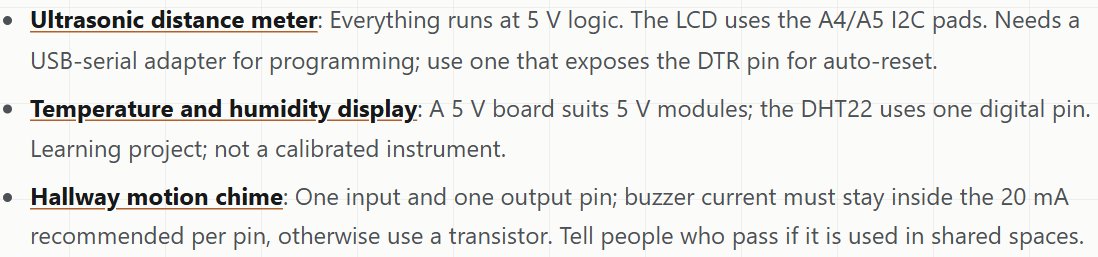
The notes under each idea come from the same sources as the page: the logic level, which pins the bus uses, and current limits. When you open one, Soldr picks the parts, assigns pins from the board's published pinout, checks power and logic levels, and shows how to wire every part. Then it writes the code and compiles it, and you can edit the code and recompile in your browser.
To find a page, start from the boards or components index. Each page has a Buy on Compoden link to the part we stock, for example the MPU6050 module or the ESP32-DevKitC. If you're choosing pins by hand, this guide explains why the choice matters. For the address side of I2C wiring, see I2C address conflicts.
Ready to build? Describe your project on app.soldr.ai. Sign in and get 100 credits free.