6 November 2026 · Soldr
Why a chatbot's Arduino code needs pin and power checks
Short answer: yes, a general-purpose chatbot such as ChatGPT can write Arduino code, and it's often valid C++. What it can't know unless you tell it is your exact board, your exact modules, your wiring and your power supply. So before you flash chatbot code, check the pins, the libraries, the logic levels, the power and the wiring, and compile it for your board. Or use a tool that does those checks from the start.
Ask a chatbot for "Arduino code for a temperature sensor and an OLED" and you'll get a tidy sketch. It may even work. But the sentence left out almost everything that decides whether it works on your bench: which board, which sensor module, which OLED, which pins you wired, and what powers it. The chatbot fills those gaps with plausible defaults, and plausible defaults are exactly what's hard to spot when they're wrong.
We've written before about where chatbots help with Arduino and ESP32 and why they can't build a project for you. This post is the practical part: the checks to run on chatbot code before you flash it.
Check 1: the pins exist, and are safe, on your board
A sketch can name a pin your board doesn't break out, or one that's unsafe to use. On an ESP32, some pins are read at boot, some are input-only and some belong to the flash memory; a sensor on the wrong one can stop the board booting. On an Uno, pins 0 and 1 are the USB serial lines.
How to check: find every pin number in the code and look each one up on your board's pinout. More: which pin to use, and why it matters.
Check 2: the libraries match your modules
Two modules sold as "0.96 inch OLED" can use different driver chips. A sketch written for one library won't drive the other, and the screen just stays blank.
How to check: read the part number on your module (for an OLED, the driver chip), and confirm the sketch includes a library for that chip. Install each library it needs.
Check 3: the logic levels match
An Uno is 5 V; an ESP32 is 3.3 V. A chatbot that doesn't know which modules you have can't know whether a level shifter or divider is needed.
How to check: for every module, find its supply and logic voltage, and compare with the board.
Check 4: the power adds up
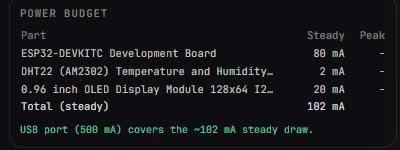
Code says nothing about current. A servo or motor can draw far more at start-up than a board's pins can give, and the board resets with no error message.
How to check: add up what each part draws, including peaks, and compare with your supply. Motors get their own supply. The classic symptom: a board that reboots when the motor starts.
Check 5: the wiring matches the code
If you wired from one diagram and the code came from a separate answer, they can disagree. Nothing looks wrong; the part just doesn't respond, or an output drives the wrong thing.
How to check: write down which pin each part is on, and compare with every pin number in the sketch.
Check 6: it compiles for your board
Compile the sketch for the exact board, with the libraries you installed. A compile error now is cheaper than a confusing fault later. If the IDE refuses code that should be fine, it's usually a version difference.
How to get better code from any chatbot
- Name the board exactly ("ESP32 DevKitC", not "an ESP32").
- Name each module with its part number or driver chip.
- Give the pins you've already wired, and ask it to use only those.
- Say what powers the build, and ask what each part draws.
Or start from a tool that checks these
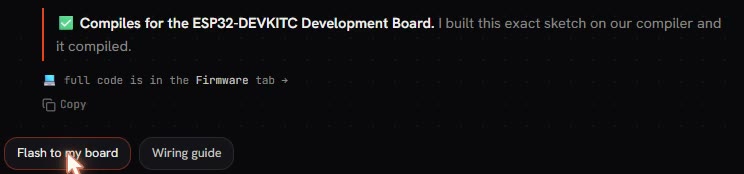
A tool grounded in real hardware does these checks before it writes the code. Soldr picks specific modules Compoden stocks, allocates pins from the board's published pinout (avoiding boot and input-only pins), checks logic levels and the power budget, generates the wiring and the code from one pin plan, and compiles the exact sketch for your board:
It also tells you what the IDE needs if you'd rather take the code there: the board setting and the libraries to install. When it doesn't have a verified pinout for a board, it says so and asks for your wiring rather than guessing. The full list: is AI-generated Arduino code safe to flash?
Parts from the examples
- ESP32-DEVKITC development board
- DHT22 temperature and humidity module
- 0.96 inch OLED (SSD1306), 128x64 I2C
Tools: the Arduino code generator and the ESP32 code generator.
Questions
Can ChatGPT write Arduino code?
A general-purpose chatbot can write valid Arduino code. Whether it works on your board depends on pins, libraries, logic levels, power and wiring it can't see, so check those before flashing.
Why does chatbot code compile but not work?
Compiling only proves the code is valid. It doesn't prove the pins match your wiring, the library matches your module, or the supply can run the parts.
How is Soldr different from a chatbot?
It works from real parts and the board's published pinout, checks pins, logic levels and power, draws the wiring from the same pin plan as the code, and compiles the sketch for your board.
What does it cost?
Questions are free; code and compiles cost credits. Sign in and get 100 credits free.