6 November 2026 · Soldr
Write and compile Arduino code online, without the IDE
Short answer: on app.soldr.ai, describe your build and Soldr writes the Arduino code for it. Press Compile and the sketch is built on Soldr's server for your board (a .hex for an Uno, a .bin for an ESP32). Edit the code in the browser and recompile as often as you like, then flash from Chrome or Edge or download the sketch. There's no IDE, board package or library to install.
Compiling Arduino code normally needs the IDE, the right board package, the right libraries and a computer that can run them. An online code writer moves all of that to a server. Here's what that looks like in practice, and where it helps.
Write: code for your build, not a generic example
Describe the build in plain words and name the board. Soldr picks the parts, assigns the pins, shows how to wire them, and writes the sketch for those exact pins. The code arrives in the Firmware tab, which is an editable source editor with a board picker, Compile and Copy:
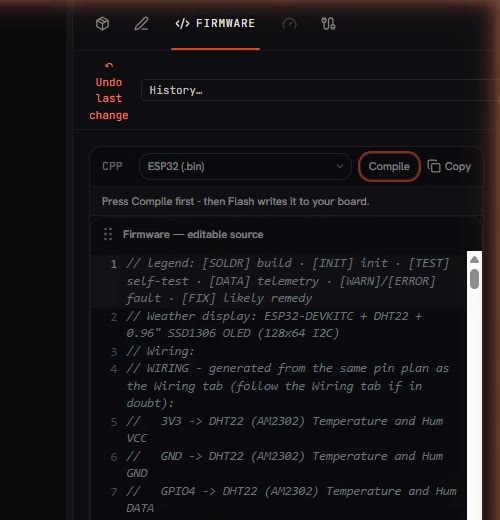
The sketch's header lists the wiring it expects, generated from the same pin plan as the Wiring tab, so the code and the diagram agree.
Compile: on the server, for your board
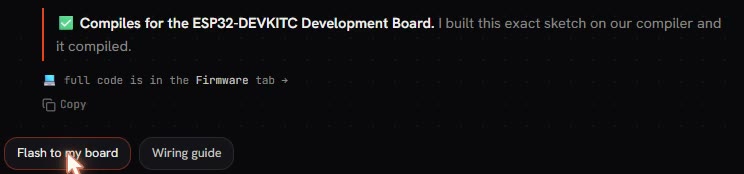
When Soldr writes the code, it compiles that exact sketch first and shows the verdict. If it couldn't check the code, it says so.
To build the file you'll flash, press Compile in the Firmware tab. You see it working, then the result and the time it took:
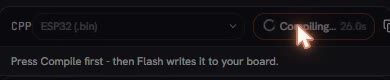

For scale, from our own builds: an ESP32 weather display took 58.4 seconds to a .bin, and an Uno LED-matrix sketch took 9.1 seconds to a .hex. ESP32 builds are bigger, so they take longer. A compile costs 5 credits.
.hex or .bin: what the compile produces
The compiler turns your sketch into the machine code your board runs. For AVR boards like the Uno, Mega and Nano that's a .hex file; for ESP32 boards it's a .bin image. The board picker in the Firmware tab sets the target, and the result line names the file type, so you can see at a glance that the sketch was built for the right family of chip. Flashing writes that file to the board; downloading the sketch gives you the source to build it yourself elsewhere.
Edit and recompile
Change a delay, a threshold or a message right in the editor, then press Compile again. If the change breaks the build, the compile tells you before anything reaches your board. Change one thing at a time; it makes the cause of any new problem obvious.
If your own IDE refuses to compile code that Soldr compiled, it's usually a board package or library version difference. Here's why, and what to do.
Then flash it, or take it with you
- Flash from the browser. On Chrome or Edge on a computer, Arduino Uno, Mega and Nano boards and ESP32 boards flash over USB, and a Raspberry Pi Pico in two presses. Step by step: uploading code from the browser.
- Watch it run. The Serial Monitor is in the same tab.
- Take it with you. Copy or download the sketch and use it in the Arduino IDE or PlatformIO.
What "it compiles" proves, and what it doesn't
A successful compile proves the code is valid for that board: the syntax is right, the libraries exist, and the program fits in memory. It doesn't prove the sketch matches your wiring, that your sensor is the one the code expects, or that the power supply can keep up. That's why Soldr generates the wiring and the code from the same pin plan, and runs a power check on every build. More: code that reviews its own wiring.
What you need
- A browser. Chrome or Edge on a computer if you want to flash from it.
- A Soldr account for your project's code. Sign in and get 100 credits free.
- For flashing: the board and a USB data cable. Boards with a CP2102 or CH340 USB chip may need a one-time USB driver.
When an online compiler helps most
- You're on a computer where you can't install software (a lab or office machine), but Chrome or Edge is there.
- You want to try an idea without setting up board packages and libraries first.
- You switch between an Uno and an ESP32 and don't want to manage two toolchains.
And when it doesn't: if you need a library or board Soldr doesn't support, or you're working offline, the desktop IDE is still the right tool. Many people use both: Soldr to plan, write and check the build, the IDE for deep customisation.
Parts from these examples
More: the online Arduino IDE, the Arduino code generator, and how to use Soldr.
Questions
Can I compile Arduino code online for free?
Questions on Soldr are free; generated code and compiles cost credits (a compile costs 5). Sign in and get 100 credits free.
Do I need to install libraries or board packages?
No. The compile runs on Soldr's server with what the build needs. You only need Chrome or Edge to flash.
Can I edit the code and recompile?
Yes. The Firmware tab is editable source; change the code and press Compile again.
Can I use the code in the Arduino IDE?
Yes. Copy or download the sketch and open it in the IDE or PlatformIO.