8 November 2026 · Soldr
TP4056 charging basics: what the chip does and what it doesn't
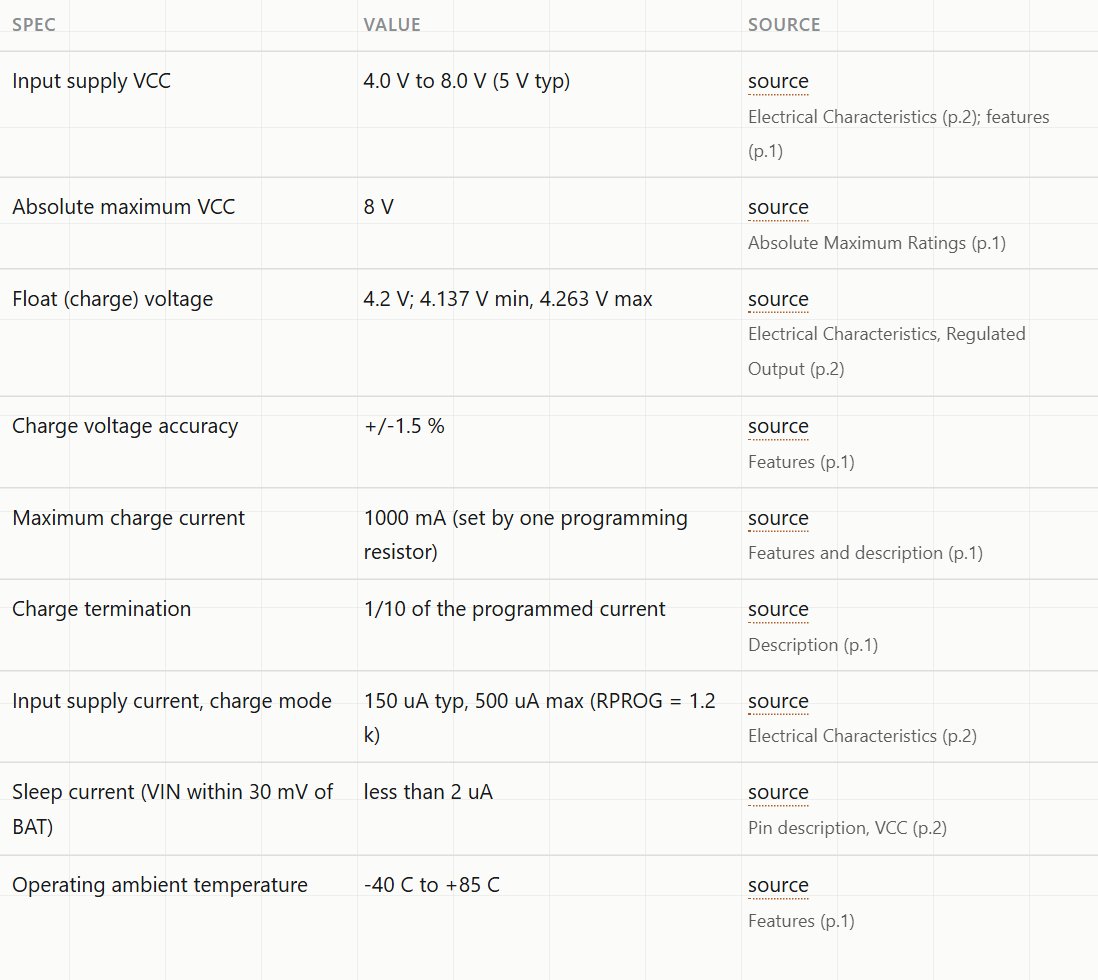
Short answer: the TP4056 charges one lithium-ion cell to a fixed 4.2 V, at up to 1 A set by a single resistor, and stops when the current falls to a tenth of that. It takes 4.0 to 8.0 V in. It does not protect the cell from over-discharge or a short on its own; modules add a separate protection chip for that. Use cells rated for a 4.2 V charge, charge at or below the cell's rated current, and never leave a charging lithium cell unattended.
The small blue TP4056 board with a USB socket is how many projects add a rechargeable battery. It's a good chip, used within its limits. Here's what its datasheet says, as cited on our TP4056 reference page, and the board-level details the datasheet doesn't cover.
What the datasheet says
- Input: 4.0 to 8.0 V (5 V typical), absolute maximum 8 V.
- Float (full-charge) voltage: 4.2 V, ±1.5 % (4.137 to 4.263 V).
- Charge current: up to 1000 mA, set by one resistor on the PROG pin. The datasheet table runs from 10 kΩ = 130 mA to 1.2 kΩ = 1000 mA.
- Termination: charging ends when the current drops to 1/10 of the programmed value.
- Temperature input: the TEMP pin can watch a thermistor in the battery pack. Charging pauses if TEMP stays below 45 % or above 80 % of the input voltage for more than 0.15 s. Grounding the pin disables the check.
Match the cell to the charger
- One cell only. The TP4056 charges a single cell. Cells in series need a charger made for that.
- 4.2 V chemistry only. Use it with lithium-ion or lithium-polymer cells whose datasheet gives 4.2 V as the full-charge voltage. Cells with a different full-charge voltage need a different charger.
- Charge current at or below the cell's rating. Small pouch cells often have a low maximum charge current. Check the resistor on your module's PROG pin against the table above, and change it if the module charges faster than your cell allows.
Protection is a separate chip
The TP4056 controls charging. It doesn't cut the battery off if your project drains it too far, or if the output is shorted. Many modules add a protection chip (often a DW01A with a pair of MOSFETs) and separate output pads for the load. That's a module feature, and no official document covers it, so look at your board:
- Battery pads (often B+ and B−) go to the cell.
- Output pads (often OUT+ and OUT−), on modules that have them, go to your project, so the load is behind the protection.
- If your module has no protection chip, use a protected cell, or add protection.
Safe charging habits
Lithium cells store a lot of energy. A damaged, punctured or overcharged cell can swell, vent or catch fire. So:
- Never charge unattended, and never overnight. Stay nearby, and unplug when you leave.
- Charge on a non-flammable surface, away from paper, fabric and other things that can burn.
- Stop using any cell that's swollen, dented, punctured or hot, and dispose of it properly.
- Respect the input range. 8 V is the chip's absolute maximum; a 5 V USB supply is the intended input.
- Let it cool. At high charge current the chip gets warm; give the module some air.
Using it in a build
A typical portable project is a cell, a TP4056 module with protection, and the board powered from the module's output. An ESP32 or NodeMCU board needs 3.3 V from its regulator, and a cell's voltage falls as it discharges, so check how your board's regulator behaves near the bottom of the cell's range. Our power budget guide covers adding up the current.
Soldr's reference pages apply the same rule to project ideas on battery parts: none suggests leaving a battery charging unattended. When you describe a battery build, say what cell you have ("a single 3.7 V LiPo cell, 1000 mAh"), so the parts and power plan fit it.
On Compoden: TP4056 charger module with protection. Describe your build on app.soldr.ai. Sign in and get 100 credits free.