8 November 2026 · Soldr
Original vs compatible Arduino Uno and Nano: what actually differs?
Short answer: the main chip, memory, pin layout and 5 V logic are the same. The main difference is the USB chip: the original Uno uses an ATmega16U2, while common compatible boards use a CH340, which some computers need a one-time driver for. Compatible Nanos often ship with the older bootloader, so you pick that option when uploading. And only the original has its own official datasheet.
Compoden stocks both kinds: the original Arduino boards and Arduino-compatible boards built on the same open design. People ask which to buy. For most projects, both run the same sketch on the same wiring. The differences are in the parts around the main chip, the documentation and a few setup details. Here they are, from the official documents.
The Uno: what's the same
From the official Arduino UNO R3 (A000066) datasheet and the reference used for our compatible Uno R3 page:
- Main chip: ATmega328P at 16 MHz.
- Memory: 32 KB flash, 2 KB SRAM, 1 KB EEPROM.
- 14 digital pins (6 with PWM) and 6 analog inputs, in the standard Uno header layout.
- 5 V logic, 20 mA maximum per I/O pin, 50 mA maximum from the 3.3 V pin.
- USB input up to 5.5 V; a power jack / VIN for 6 to 20 V (7 to 12 V nominal).
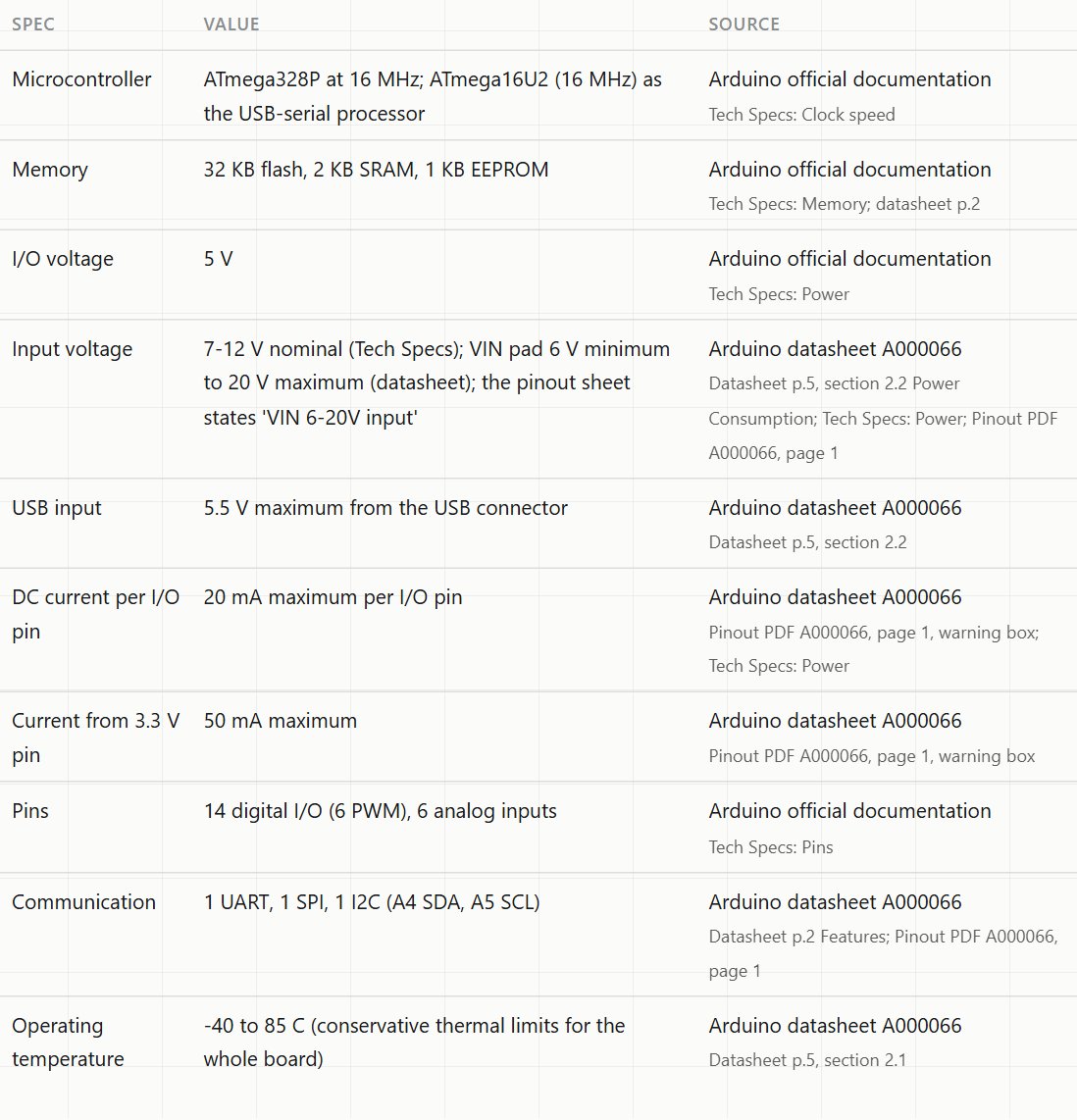
For sketches, shields and wiring, that's what matters, and it matches.
The Uno: what's different
- The USB chip. The original uses an ATmega16U2 as its USB-serial processor. The compatible board we stock uses a CH340G. Both let you upload sketches and use the Serial Monitor. On some computers the CH340 needs a one-time USB driver before the port appears; the ATmega16U2 usually works without a separate driver.
- Documentation. The original has its own official datasheet and full pinout sheet. A compatible board follows the same design, but its own regulator, USB chip wiring and component choices aren't in any official document. Our compatible Uno page is honest about that: most rows cite the Arduino reference documents, and one row cites our own listing.
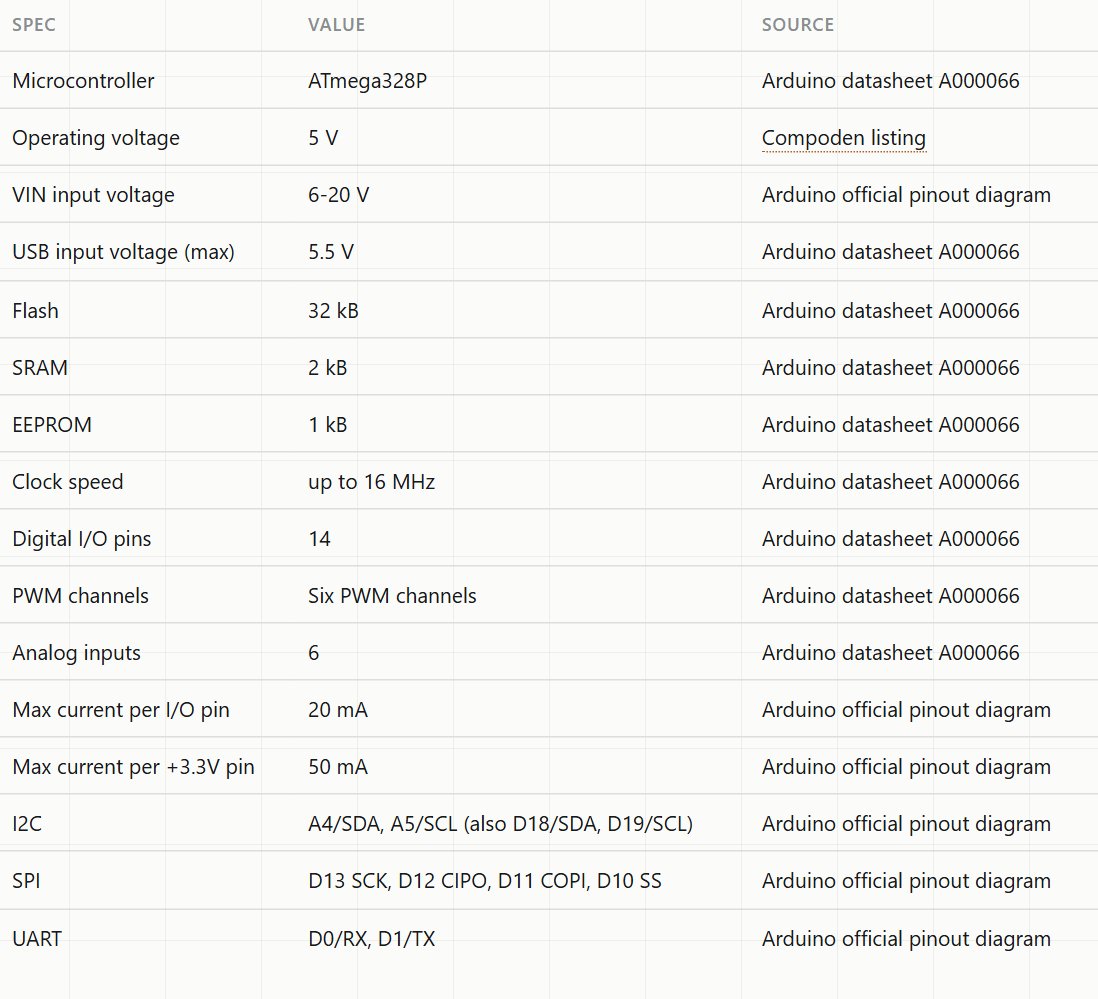
The Nano: same story, two extra details
The official Arduino Nano (A000005) and the compatible Nano R3 we stock share the ATmega328 core, 32 KB flash (2 KB used by the bootloader), 2 KB SRAM, 8 analog inputs, 5 V logic and the breadboard-friendly format. Both use a Mini-B USB port. The differences:
- USB chip. The compatible Nano uses a CH340, with the same possible one-time driver.
- Bootloader. Many compatible Nanos ship with the older bootloader. When an upload fails with a sync error, choose the "ATmega328P (Old Bootloader)" processor option and try again. For browser flashing, Soldr supports the Nano with the old bootloader; a Nano with the newer bootloader may fail there.
What doesn't differ as much as people think
- Your code. The same sketch compiles for both, with the same board selection (apart from the Nano bootloader option).
- Shields and wiring. Same header layout, same pin numbers.
- Datasheet limits. The ATmega328P's own limits come from Microchip's datasheet and apply to both. If you want to read them, our ATmega328P page cites them line by line.
How to tell which one you have
- Look next to the USB connector. The original Uno has a small square ATmega16U2 there. Compatible boards usually have a chip marked CH340G (Uno) or CH340 (Nano).
- Check the port name. With the board plugged in, the serial port's name in your computer's device list usually includes the USB chip's name.
- Read the silkscreen. Compatible boards often add their own markings or leave some out. Trust the printed pin labels when they differ from a photo.
The same thinking applies to other compatible boards. Our Pro Mini 5V page, for example, follows the original reference design and says up front that the stocked board is a compatible version whose regulator and header order aren't covered by an official document.
Which to buy
- Buy the original if you want the officially documented board, a USB chip that usually needs no extra driver, or a board for a lab or product where the paperwork matters.
- Buy a compatible board for learning, for projects where you may need several boards, or where you're happy to install one driver.
Either way, check the board's own silkscreen against the pin table before you wire, and read the first lines in the Serial Monitor after you upload. Here's what to look for.
On Compoden: the original Arduino UNO R3, the compatible Uno R3 (CH340G), the original Arduino Nano and the compatible Nano R3 (CH340). Not sure a Uno is the right board at all? See ESP32 vs Arduino Uno.
Build with either on app.soldr.ai. Sign in and get 100 credits free.