8 November 2026 · Soldr
DHT11 or DHT22 reads NaN? Six causes and how to fix them
Short answer: "NaN" means the read failed and the library had no number to give you. The usual causes are reading faster than every 2 seconds, a missing pull-up on the data line (about 4.7 kΩ), reading straight after power-up, a long wire at 3.3 V, the wrong sensor type in the code, or a data wire on the wrong pin. Each is quick to check.
The DHT11 and DHT22 talk over a single data wire with tight timing. When any part of that exchange goes wrong, common Arduino libraries return NaN (not a number) instead of a temperature or humidity. The fixes come straight from the sensor datasheets, as cited on our DHT11 and DHT22 reference pages.
1. Reading too often
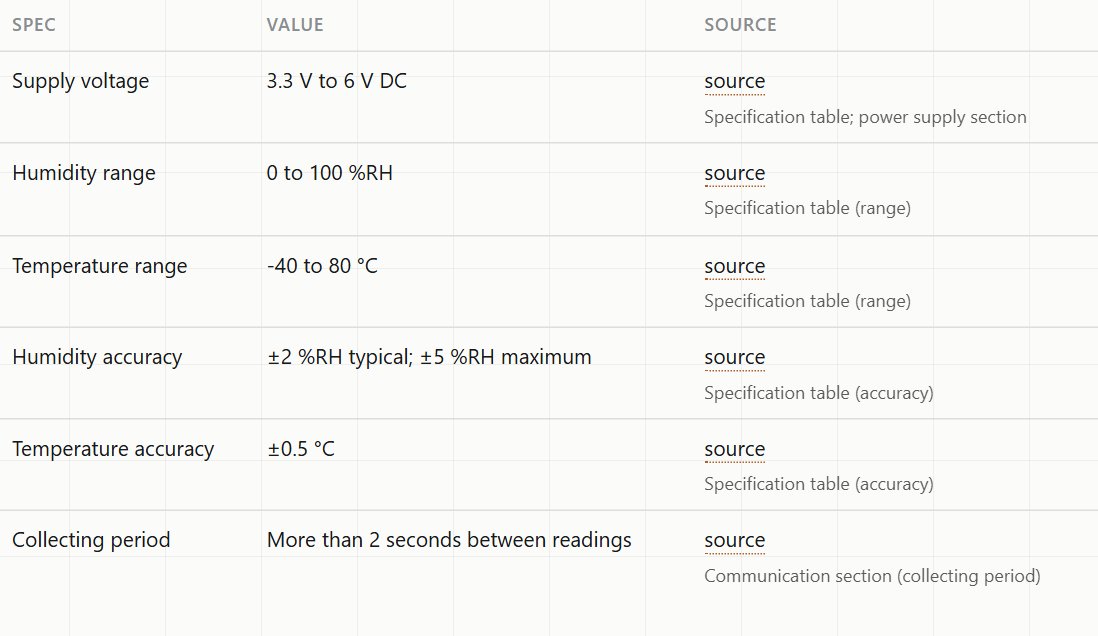
Both datasheets set a minimum gap: more than 2 seconds between readings (the DHT22's "collecting period"). A loop that reads every 500 ms gets a good value now and then and NaN the rest of the time. Read every 2 seconds or slower, and keep the last good value in between.
2. No pull-up on the data line
The DHT11 datasheet uses a pull-up of about 4.7 kΩ from the data line to the supply, for cables under 5 m. Without it the line floats and the sensor's reply is lost. Many three-pin modules include a pull-up on the board, but that's a module detail no official document confirms, so if you're using a bare four-pin sensor, or you're not sure, add one.
3. Reading straight after power-up
The DHT22 datasheet says not to send any instruction while the sensor is powering up. A sketch that reads in setup() the instant the board starts often gets NaN on the first reading. Wait a couple of seconds after power-up before the first read, or simply discard the first value.
4. A long wire at 3.3 V
Both sensors run from 3.3 V: the DHT11 is rated 3.3 to 5.5 V and the DHT22 3.3 to 6 V. But the DHT11 datasheet warns that at 3.3 V the supply cable should be as short as possible. On an ESP32 with the sensor at the end of a long wire, readings get flaky. Shorten the wire, or power the sensor from 5 V and protect the ESP32's data pin, since the data line then swings to 5 V. More on that in 5 V sensors on a 3.3 V ESP32.
5. The wrong sensor type in the code
The DHT11 and DHT22 use different data formats. Most libraries ask you to say which one you have. Tell a library you have a DHT22 when it's a DHT11, or the other way round, and the values come out wrong or as NaN. The blue sensor is usually the DHT11 and the white one the DHT22, but check the marking.
6. The data wire isn't where the code thinks it is
Check that the pin number in the code matches the pin you wired, and that the sensor's pins are in the order you think. The bare sensor has four pins: VCC, DATA, an unconnected pin, and GND. Three-pin modules drop the unconnected one and their order varies, so read the labels printed on yours.
A sketch that tells you which one it is
A good sketch reports the failure instead of printing NaN forever. The sketches Soldr writes print a self-test at startup and a reading line after that, so a failure shows up as a named line in the Serial Monitor, with what to check. Here's how to read those lines.
Which sensor to choose
- DHT11: ±5 %RH and ±2 °C. Fine for "is the room humid?".
- DHT22: ±2 %RH typical, ±0.5 °C, with 0 to 100 %RH and −40 to 80 °C ranges. Better when the number matters.
Both read slowly, at most once every 2 seconds. If you need faster or I2C readings, our reference pages cover I2C alternatives such as the SHT30 and BME280.
On Compoden: DHT11, DHT22. Describe your build on app.soldr.ai. Sign in and get 100 credits free.