8 November 2026 · Soldr
BME280 vs BMP280: why your "BME280" has no humidity
Short answer: the BMP280 measures pressure and temperature. The BME280 measures pressure, temperature and humidity. They share the same I2C addresses (0x76 or 0x77) and very similar modules, so they're easy to mix up. If a BME280 library says it can't find the sensor, or humidity reads 0 or NaN, you most likely have a BMP280. Use a BMP280 library, or swap to a BME280 if you need humidity.
Both chips come from the same maker and are often sold on breakout boards that look almost the same. The difference is one sensor element, and it decides whether your weather station can report humidity. Here's what each datasheet says, as cited on our BMP280 and BME280 reference pages.
Side by side
- Measures: BMP280: pressure and temperature. BME280: pressure, temperature and humidity (0 to 100 %RH).
- Pressure range: both 300 to 1100 hPa.
- Supply: both VDD 1.71 to 3.6 V and VDDIO 1.2 to 3.6 V. Neither chip takes 5 V; the BME280's absolute maximum on a supply pin is 4.25 V.
- I2C address: both 0x76 with SDO to ground and 0x77 with SDO to VDDIO. Neither datasheet allows SDO to float.
- Operating temperature: both −40 to +85 °C.
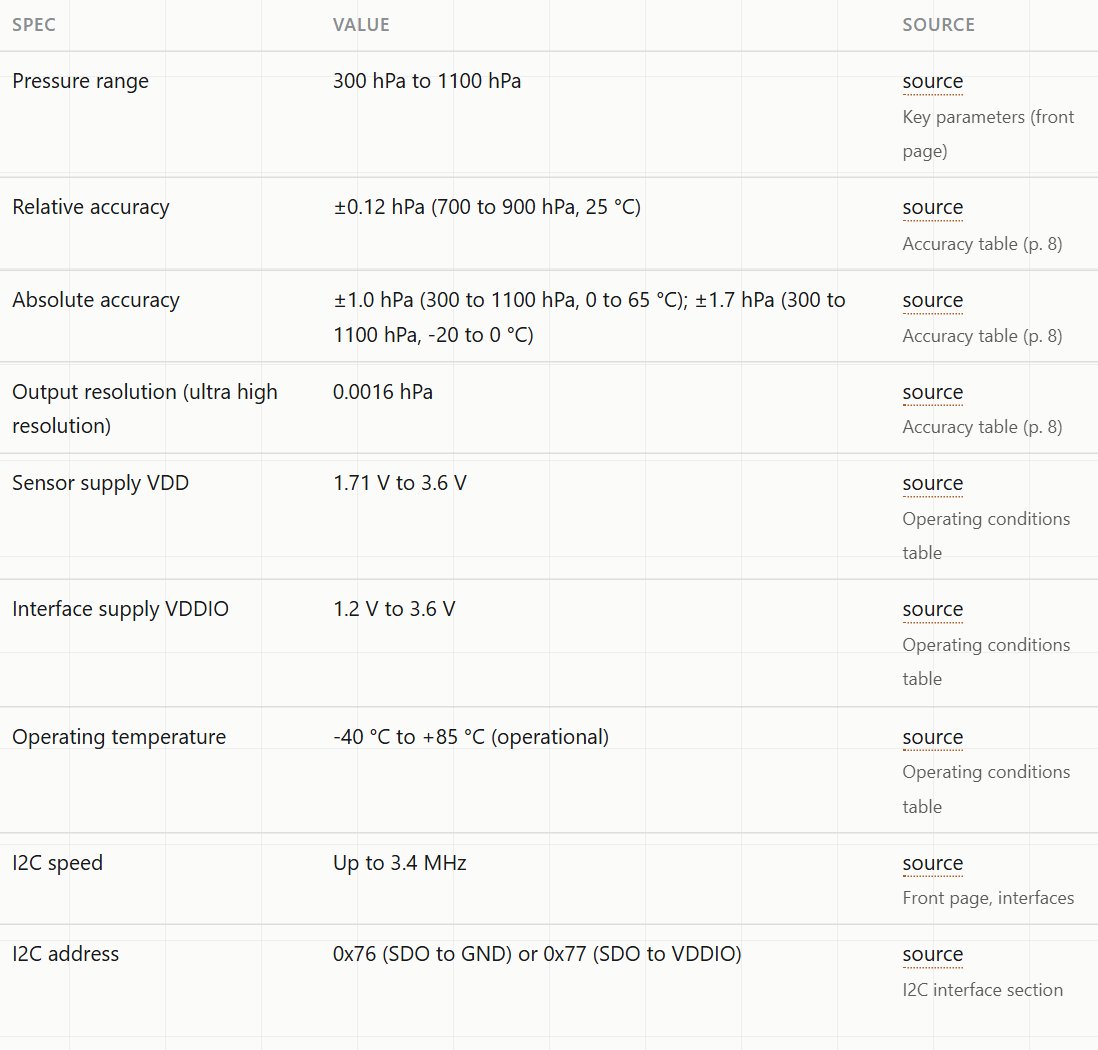
Notice what's missing from the BMP280 table: humidity. It isn't a setting you can turn on. The sensor element isn't there.
Symptoms of a mix-up
- A BME280 library reports that it can't find a valid sensor, even though an I2C scanner shows a device at 0x76 or 0x77. Both chips report their identity in an ID register, and good libraries check it, so a BME280 library rejects a BMP280.
- Pressure and temperature work, humidity reads 0 or NaN, with a library that doesn't check the ID.
- Your listing or code says BME280, but the readings never change with humidity, for example when you breathe on the sensor.
How to tell which one you have
- Run an I2C scanner. It confirms there's a device at 0x76 or 0x77 but can't tell the two apart, because the addresses are the same. See I2C address conflicts for a scanner sketch.
- Try a BME280 library. If it refuses the sensor, it's almost certainly a BMP280.
- Check the listing and the marking. The module label or product name should say which chip it carries.
Wiring either one
- Power. The chips are 3.6 V parts. Modules sold for "3.3 to 5 V" carry a regulator that no official document describes. On an ESP32 or NodeMCU, power the module from 3.3 V.
- Address. Tie SDO to ground (0x76) or to the I/O supply (0x77), and use the same address in your code. Two of these on one bus need one at each address.
- Pull-ups. The BME280 datasheet says the I2C data line is open-drain and must be pulled up to VDDIO. Most modules include the pull-ups.
- Power sequencing. The BMP280 datasheet warns that holding its interface pins high while VDDIO is off can damage the chip through its protection diodes. Power the sensor from the same supply as the board's I/O.
More on mixing levels in 5 V sensors on a 3.3 V ESP32.
Which to buy
- Need humidity (weather station, room comfort, plant tent): BME280.
- Need only pressure and temperature (altitude, pressure trend): BMP280 does the job.
- Need gas as well: the BME680 adds a gas sensor element to the same set.
When you describe a weather build on Soldr, name the exact sensor ("a BME280 for humidity"), so the parts and the library match what you need.
On Compoden: BME280 module, BMP280 module. Describe your build on app.soldr.ai. Sign in and get 100 credits free.